Forex Market Scanner to Find Trading Setups Faster
Forex Market Scanner to Find Trading Setups Faster
The forex market trades $7.5 trillion per day across 127+ currency pairs, plus crypto, indices, and commodities. Manually scanning this volume of data is impossible—even experienced traders can only monitor a handful of assets effectively.
A forex market scanner—also called forex scanner software—filters through hundreds of instruments to identify potential trading setups based on your criteria. This type of market scanner for forex saves time by surfacing relevant opportunities and helps you avoid missing setups in markets you don't actively monitor.
ForexGPT's ai forex scanner analyzes 127+ assets in real-time, ranking them by Sentiment Score to identify the top bullish and top bearish setups. This automated market scanner delivers actionable insights with Sentiment Scores and multi-timeframe confirmation. Let's explore how market scanners work and how to use them effectively.
Why Traders Use Market Scanners
Manual market scanning requires reviewing multiple charts, indicators, and data points for each asset. For a trader monitoring 20+ assets daily, this becomes time-consuming and prone to oversight.
Market scanners solve this problem by automating the initial filtering process. They:
- Scan hundreds of assets simultaneously
- Apply predefined criteria to filter noise
- Surface assets that meet your specific conditions
- Present findings in an easy-to-review format
The Time-Saving Benefit
Without a scanner, you might spend 10-15 minutes per asset checking charts and indicators. With 20 assets, that's 3-4 hours of manual work per day.
With a forex setup scanner, you can scan all 127+ assets in seconds, then focus your attention on the 5-10 assets that meet your criteria. This forex scanner tool eliminates the bottleneck of manual chart review.
Reducing Missed Opportunities
Market conditions change rapidly. A setup that appears at market open might disappear by lunchtime. Continuous scanning ensures you don't miss opportunities due to timing issues.
How ForexGPT's Market Scanner Works
ForexGPT's market scanner is powered by the scan_market tool, which analyzes all supported instruments in real-time.
The Scanning Process
When you trigger scan_market, the following process occurs:
- Data collection: Real-time OHLC price data and spreads are pulled from OANDA
- Technical indicator calculation: Core indicators (SMAs 7/14/50/100, Bollinger Bands, Donchian Channels) are calculated for each asset
- Sentiment scoring: Sentiment Scores (-100 to +100) are generated for each asset using the sentiment analysis engine
- Ranking: Assets are ranked by Sentiment Score strength
- Signal generation: Bullish/bearish/neutral readings with entry, stop-loss, and take-profit levels are produced
- Result aggregation: All findings are compiled into a single view
The entire process takes seconds, regardless of how many assets you're scanning.
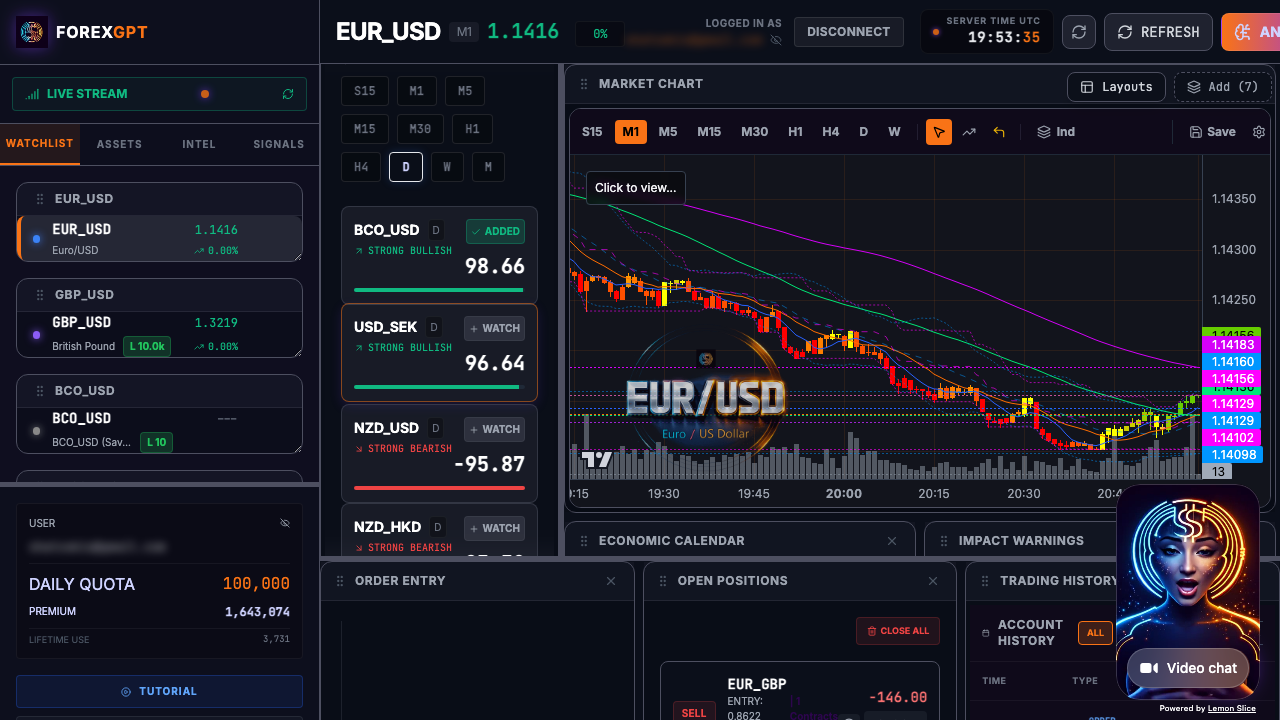
The Scan Results Interface
The scanner output presents each asset with:
- Current price and change
- Bullish/bearish/neutral signal
- Sentiment Score (-100 to +100)
- Key technical indicator readings
- Entry, stop-loss, and take-profit levels
You can sort by any column, filter by signal type, and expand individual assets for more details.
Free vs Pro Scanning Capabilities
The free tier includes full access to scan_market for all 127+ assets. This gives you:
- Real-time scanning of all supported instruments
- Bullish/bearish/neutral readings
- Technical and sentiment data
- Sorting and filtering capabilities
The Pro tier adds:
- Custom scanning filters (save your criteria)
- Watchlist-specific scanning
- Historical scan results
- Voice-controlled scanning commands
- Integration with trading execution
What to Look For in Scan Results
Not all scan results are equally actionable. Here's how to interpret and prioritize findings.
Sentiment Score Strength
Each scan result includes a Sentiment Score (-100 to +100) indicating how strongly the technical data supports the signal. Scores near the extremes (e.g., above +70 or below -70) represent stronger setups than scores near 0.
However, don't dismiss moderate scores entirely—they might represent emerging patterns that haven't yet fully materialized.
Multiple Timeframe Confirmation
ForexGPT's Pro version shows multi-timeframe signals for each asset. Look for:
- Daily and 4-hour alignment: Signals that align across these timeframes carry more weight
- 1-hour confirmation: Shorter-term confirmation of the larger trend
- Conflicts: When timeframes disagree, it signals caution
Technical Indicator Alignment
The scanner evaluates how core indicators align for each asset:
- SMA alignment: Whether price is above or below SMAs 7, 14, 50, 100
- Bollinger Band position: Where price sits within the upper, middle, and lower bands
- Donchian Channel position: Where price sits within the recent range
- Overall momentum: The combined directional bias from all indicators
Understanding what's driving the Sentiment Score helps you assess the quality of the signal.
Volatility Considerations
High volatility can make signals less reliable. Check the ATR (Average True Range) and volatility metrics in scan results:
- High volatility: Larger price swings, signals may be less precise
- Low volatility: Tighter ranges, signals may be more reliable but moves smaller
- Changing volatility: Volatility spikes often precede significant moves
From Scan to Analysis: Your Daily Trading Workflow
The scanner is just the first step in your analysis workflow. Here's a detailed step-by-step process showing how to use the ForexGPT market scanner effectively for daily trading.
Step-by-Step Trading Workflow
Step 1: Morning Scan Setup Begin your trading day by running a comprehensive market scan. Set your parameters based on your trading style—specify your preferred timeframes and minimum Sentiment Score threshold before initiating the scan. The scanner will rank assets by sentiment strength.
Step 2: Review Initial Scan Results After the scan completes, examine the results:
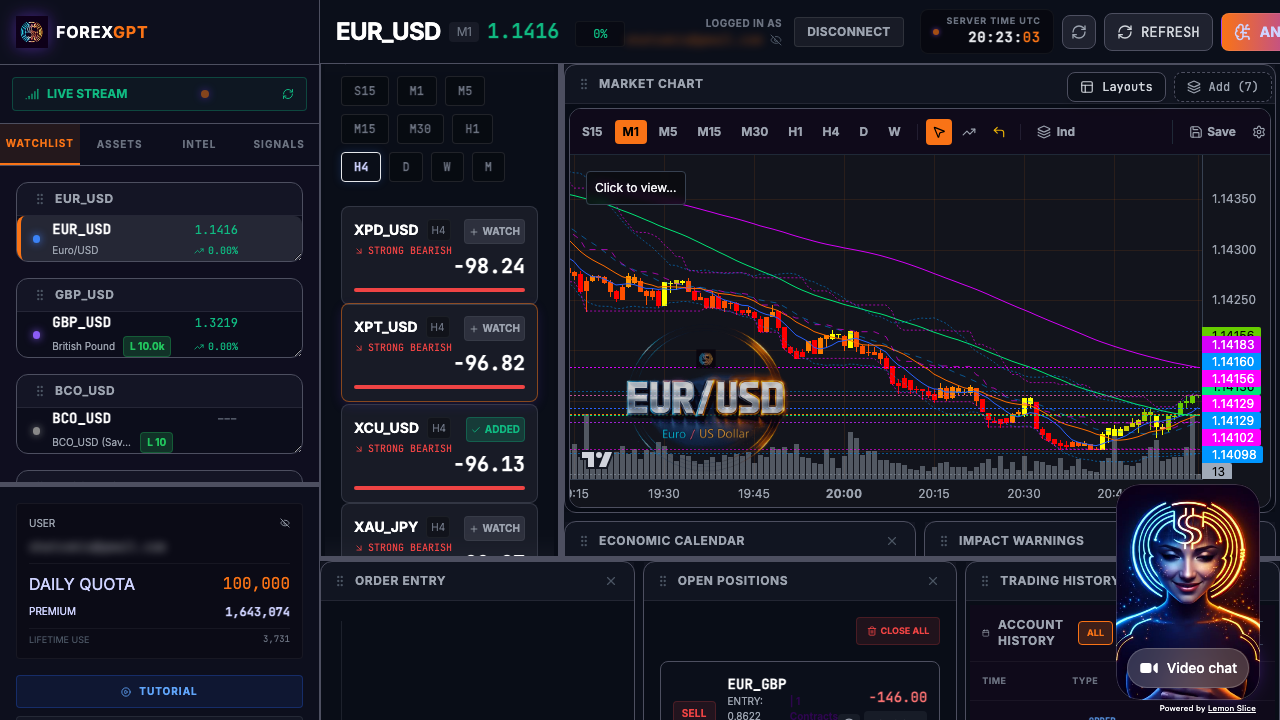
The interface displays each asset with key metrics:
- Current price and 24-hour percentage change
- Signal direction (bullish, bearish, or neutral)
- Sentiment Score (-100 to +100)
- Entry, stop-loss, and take-profit levels
- Core technical indicator readings
Sort results by Sentiment Score to prioritize the most promising opportunities.
Step 3: Apply Filters to Refine Results Narrow your focus using the available filters:
- Filter by signal direction (bullish only for long-side trading)
- Set minimum Sentiment Score threshold (e.g., min_score of 50 for stronger setups)
- Specify timeframes to scan
- Set a result limit to focus on the top-ranked assets
Step 4: Multi-Timeframe Analysis For top candidates, review the multi-timeframe alignment:
- Check daily timeframe for primary trend direction
- Verify 4-hour alignment with the daily trend
- Confirm 1-hour charts for precise entry timing
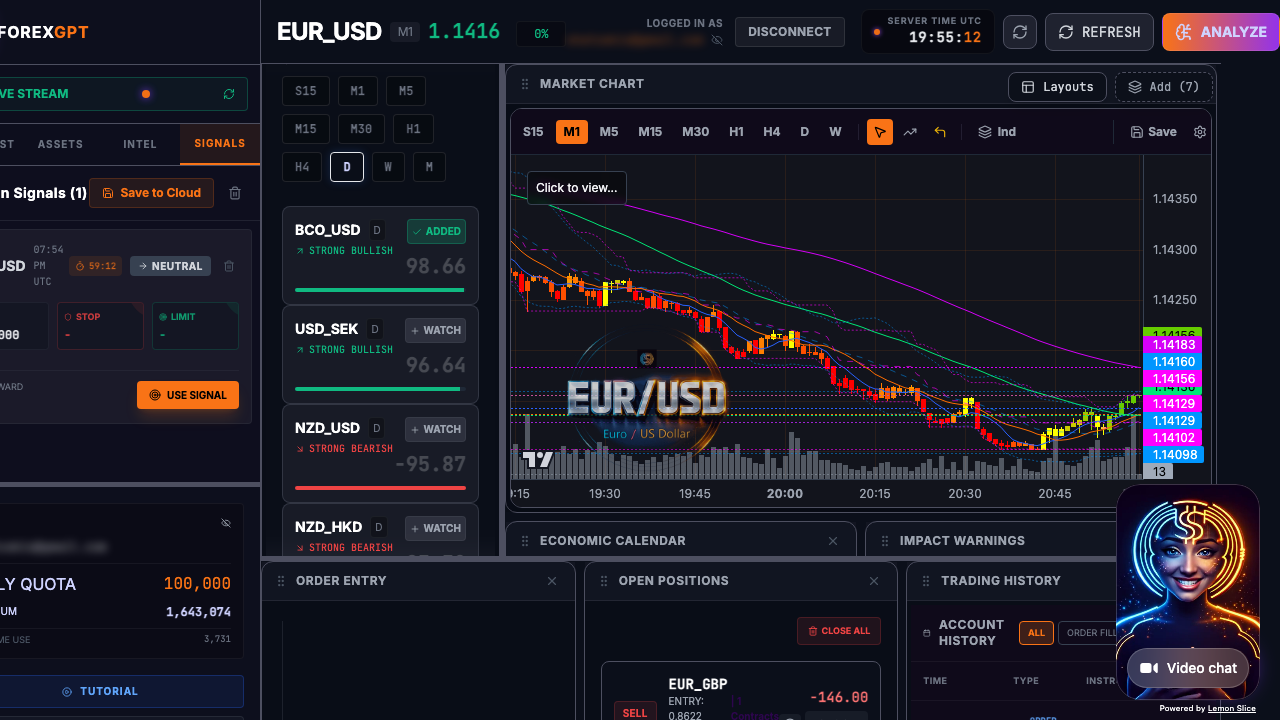
Step 5: Run Detailed Asset Analysis Select promising assets and trigger the detailed analysis using the AI trading assistant. This provides:
- Full technical indicator breakdown (RSI, MACD, Bollinger Bands, Donchian Channels, SMAs)
- Sentiment Score with technical breakdown
- Support and resistance level analysis
- Entry, stop-loss, and take-profit levels
Step 6: Visual Chart Verification Open the interactive chart to visually confirm your analysis. Look for:
- Price action at key technical levels
- Candlestick pattern confirmation
- Indicator alignment with the signal
- Clean support/resistance breaches
Step 7: Make Your Trading Decision Based on your analysis, decide on your action:
- Execute trade if all confirmation factors align
- Continue monitoring if setup is developing
- Move on if technicals conflict or Sentiment Score is near 0
Step 8: Post-Trade Review After your trade executes, use the scanner to monitor position triggers and adjust stop-loss levels as the market moves.
Scanner vs Screener vs Heatmap
ForexGPT offers three related tools for identifying opportunities. Understanding the differences helps you use each effectively.
Market Scanner
The scanner applies specific criteria to filter assets. Use it when you have specific conditions you want to find.
- Purpose: Find assets that match specific technical/sentiment criteria
- Input: Your parameters (timeframes, min_score threshold, result limit)
- Output: Assets meeting your criteria
Heatmap
The heatmap provides a visual overview of market performance. Use it to identify which markets are active and trending.
- Purpose: Visual overview of asset performance
- Input: None (shows all assets)
- Output: Color-coded performance by asset
Screener
The screener is a subset of the scanner that focuses on finding strong setups. Use it when you want to identify high-conviction opportunities.
- Purpose: Find the strongest setups across all assets
- Input: None (uses pre-defined Sentiment Score thresholds)
- Output: Top-performing assets by strength and signal quality
When to Use Each Tool
- Morning market review: Start with heatmap to see overall market activity
- Specific strategy execution: Use scanner with your strategy parameters
- Finding high-conviction setups: Use the heatmap screener to identify strongest signals
FAQ
What does a market scanner do?
A market scanner analyzes multiple assets and identifies those meeting your specified criteria, such as technical signals, volatility levels, or sentiment readings. It automates what would otherwise require manual chart review for each asset.
Can ForexGPT scan crypto and commodities?
Yes. ForexGPT's scan_market tool covers 127+ assets including major and minor forex pairs, crypto pairs, stock indices, and commodities like gold and oil.
How often should I scan the market?
Daily scanning before market open is a common approach. Some traders also scan during the day when new setups might emerge. The scanner can be run at any time and provides real-time data.
Does the scanner provide trading signals?
Yes, the scanner produces bullish/bearish/neutral readings for each asset. These readings are analysis tools, not financial advice. Always use proper risk management and conduct your own analysis before trading.
Can I save my scanning criteria?
In the free tier, you can filter results manually each time. The Pro tier allows you to save custom scanning criteria for recurring analysis workflows.
What is signal strength and how is it calculated?
The Sentiment Score (-100 to +100) measures how strongly the current technical data supports the identified signal. It's calculated from the OHLC of the last candle combined with SMAs (7, 14, 50, 100), Bollinger Bands, and Donchian Channels—then normalized into a single score.
How does the scanner rank results?
The scanner ranks assets by Sentiment Score strength. Assets with scores near the extremes (-100 or +100) appear at the top as the strongest bearish or bullish setups. You can set a minimum score threshold (min_score) to filter out weaker signals and a result limit to focus on the top-ranked assets.
What timeframes does the scanner analyze?
The scanner analyzes multiple timeframes simultaneously. Free tier shows the primary timeframe selected by you. Pro tier provides multi-timeframe analysis covering daily, 4-hour, and 1-hour charts for comprehensive trend confirmation.
Can I use the scanner for swing trading and position trading?
Yes. While the scanner excels at identifying day trading opportunities, you can effectively use it for longer timeframes by filtering for assets with strong signals on daily and weekly timeframes, and focusing on stronger Sentiment Scores.
How does the scanner generate signals?
The scanner generates signals based on OHLC data combined with SMAs (7, 14, 50, 100), Bollinger Bands, and Donchian Channels. These inputs produce a Sentiment Score, which drives the signal direction (bullish/bearish/neutral) along with entry, stop-loss, and take-profit levels. However, signals do not guarantee future performance. Always combine them with your own analysis and judgment.
Is there a limit to how many times I can scan in a day?
The free tier includes a daily 57,000 free token allowance for scanning and other tools. Paid plans (Classic $10/mo, PRO $20/mo, VIP $100/mo) provide higher token allowances for more extensive scanning workflows.
About the Author
This article was written by the ForexGPT team, led by Steven Hatzakis—a financial services industry expert with over 20 years of experience in forex and fintech. For a deeper look at the platform architecture and methodology, read the ForexGPT White Paper. For his latest research on AI-driven trading systems, see Steven's paper on Protocol-Constrained Agentic Systems. Explore all guides and tools on the Learn resource hub.
This content was created with AI assistance, reviewed for accuracy by the ForexGPT team, and is updated regularly to reflect current platform capabilities.
Important Disclaimer
ForexGPT is a market analysis tool, not a financial advisor. All content on this page is for informational and educational purposes only. It does not constitute investment advice, financial advice, or trading advice.
Trading forex and other financial instruments involves substantial risk of loss and is not suitable for all investors. Past performance of any analysis tool or signal does not guarantee future results. You should carefully consider your investment objectives, level of experience, and risk appetite before trading.
ForexGPT does not guarantee the accuracy, completeness, or timeliness of any analysis or signal generated by its tools. Always conduct your own research and consult with a qualified financial advisor before making trading decisions.
Start Finding High-Probability Trading Setups Today
Stop wasting hours manually scanning markets. ForexGPT's AI-powered market scanner delivers actionable insights in seconds.
What You Get:
- Real-time scanning of 127+ forex pairs, crypto, indices, and commodities
- Sentiment Scores (-100 to +100) for informed decisions
- Multi-timeframe confirmation for trend alignment
- AI-powered technical analysis across all asset classes
- Professional-grade analysis tools, available in your browser
Start Scanning Markets Now - Get Free Access Today
Scan 127+ assets in seconds and focus your time on the setups that matter.