Forex Analysis Software for AI-Assisted Traders
Forex Analysis Software for AI-Assisted Traders
Forex market analysis software helps traders interpret market data and make informed decisions. It combines real-time price feeds, technical indicators, sentiment analysis, and other tools into a single platform.
Modern forex analysis software has evolved beyond basic charting and indicators. Today's best trading analysis platforms include AI-powered analysis that helps traders process information faster and identify patterns that might be missed in manual review.
ForexGPT provides a comprehensive ai forex analysis platform with 45+ AI-powered tools across market data, analysis, trading, and portfolio management. As a forex analysis tool, it covers everything from scanning to execution. Let's explore what makes up a modern analysis platform and how ForexGPT delivers AI-assisted trading workflows.
How Traders Use Forex Analysis Software: A Daily Workflow
A typical trading day involves structured analysis at key market moments. ForexGPT's tools help traders execute this workflow efficiently.
Morning Analysis (Pre-Market Review)
Before the market opens, traders use analysis software to:
- Scan the market: Run
scan_marketvia the market scanner to identify assets with strong setups overnight - Review overnight developments: Check economic calendar events and news impact
- Analyze watchlist pairs: Use
analyze_assetfor pairs of interest - Check multi-timeframe alignment: Use
analyze_timeframesto verify direction - Set up day plan: Identify key levels and potential entry points
In-Day Checks (During Market Hours)
Active traders need quick updates during the trading session:
- Quick sentiment check: Ask "What's the current sentiment for EUR/USD?"
- Monitor active positions: Review signal strength changes for open trades
- New setup evaluation: Scan for new opportunities as volatility increases
- Timeframe confirmation: Verify 1-hour and 15-minute alignment for entries
Evening Review (Post-Market Analysis)
At day's end, traders analyze performance and prepare for tomorrow:
- Daily performance review: Check P&L and analyze recent trades
- Signal history review: Review which signals were accurate and why
- Pattern analysis: Analyze which patterns formed and their outcomes
- Sentiment recalibration: Update sentiment assessment for key pairs
- Watchlist update: Add/remove pairs based on daily analysis
What Forex Analysis Software Should Include
Effective forex analysis software includes several core components that work together to provide a complete trading workflow.
Data Feeds and Market Access
Real-time price data is foundational. Good analysis software provides:
- Real-time bid/ask prices: Live market data from reputable sources
- Historical data: Years of price data for backtesting
- Multiple asset classes: Forex, crypto, indices, commodities
- Depth of data: Tick-level data where available
Charting and Technical Analysis
Interactive charts are essential for visual analysis:
- Multiple chart types: Candlestick, bar, line, Heikin-Ashi
- 20+ technical indicators: RSI, MACD, moving averages, Bollinger Bands
- Drawing tools: Trendlines, support/resistance, Fibonacci
- Multi-timeframe view: View multiple timeframes simultaneously
- Customizable layouts: Personalized chart configurations
Analysis and Interpretation Tools
Modern software goes beyond displaying data to providing interpretation:
- AI sentiment analysis: Understanding market mood
- Pattern recognition: Identifying chart patterns automatically
- Signal generation: Buy/sell recommendations based on analysis
- Risk context: Volatility and Sentiment Score measures
Trading and Execution Integration
Analysis is most valuable when paired with execution:
- Broker integration: Connect to your brokerage account
- Order types: Market, limit, stop, stop-limit orders
- Position management: View and manage open positions
- Risk tools: Position size calculators, stop-loss aids
Portfolio and Account Management
Understanding your account performance is crucial:
- Position tracking: Real-time position overview
- P&L tracking: Profit and loss per trade and overall
- Risk metrics: Margin usage, leverage, drawdown
- Trade history: Analyze past performance
ForexGPT's Analysis Stack
ForexGPT's platform is organized into categories that cover the complete trading workflow.
Market Data Tools (7 tools)
These tools provide the raw data for analysis:
- scan_market: Scan 127+ assets for setups
- get_chart_data: Retrieve candlestick data and indicators
- get_live_spreads: Current spreads across pairs
- get_economic_calendar: Upcoming economic events
- get_live_heatmap: Visual asset performance
- get_platform_health: System status
- search: Search across data and articles
Analysis Tools (5 tools)
These tools interpret the data:
- analyze_asset: Deep analysis of a specific asset
- analyze_timeframes: Multi-timeframe analysis
- analyze_sentiment: AI sentiment scoring
- analyze_patterns: Pattern recognition
- analyze_correlations: Cross-asset correlations
Trading Tools (7 tools)
Execute and manage trades:
- place_order: Market, limit, stop orders
- get_order_status: Track order status
- close_position: Close active positions
- get_position_details: Position information
- calculate_position_size: Position sizing calculator
- calculate_pip_value: Pip value calculator
- get_trade_history: Past trade records
Account Tools (8 tools)
Manage your account and risk:
- get_account_balance: Current balance
- get_margin_usage: Margin utilization
- get_equity: Account equity
- get_profit_loss: P&L tracking
- get_account_status: Account health
- set_risk_parameters: Configure risk settings
- get_account_history: Account activity log
- calculate_risk_reward: Risk-reward ratio
Agent Tools (10 tools)
Autonomous trading strategies:
- start_agent: Activate an agent
- stop_agent: Deactivate an agent
- configure_agent: Set agent parameters
- list_agents: View active agents
- get_agent_status: Agent performance metrics
- approve_trade: Approve agent proposal
- reject_trade: Reject agent proposal
- get_agent_history: Agent trade history
- modify_agent: Update agent settings
- get_agent_proposals: Pending proposals
Prop Challenge Tools (5 tools)
For proprietary trading challenge participants:
- get_challenge_status: Challenge progress
- get_target_profits: Profit targets
- get_max_drawdown: Drawdown limits
- get_day_trades: Daily trade count
- get_challenge_rules: Challenge requirements
Free vs Pro Tool Access
The free tier includes 8 essential tools, while Pro provides access to all 45+ tools.
Three Ways to Access ForexGPT
You can access ForexGPT's analysis software through three different interfaces.
AI Chat (forex-gpt.ai/chat)
The chat interface provides conversational access to all tools:
- Text and voice input: Type or speak your requests
- Interactive widgets: Visual display of results
- Context awareness: Remembers previous questions
- Natural language commands: "Scan for bullish setups"
Best for: Traders who prefer conversational interaction and quick analysis checks.
Voice (forex-gpt.ai/voice)
The voice interface enables hands-free analysis:
- Natural language commands: "Analyze EUR/USD"
- Phone dial-in access: Call with your PIN
- Real-time voice AI: Powered by LiveKit and xAI Grok
- LemonSlice avatar: Visual voice interface
Best for: Traders on the go or those who prefer voice interaction.
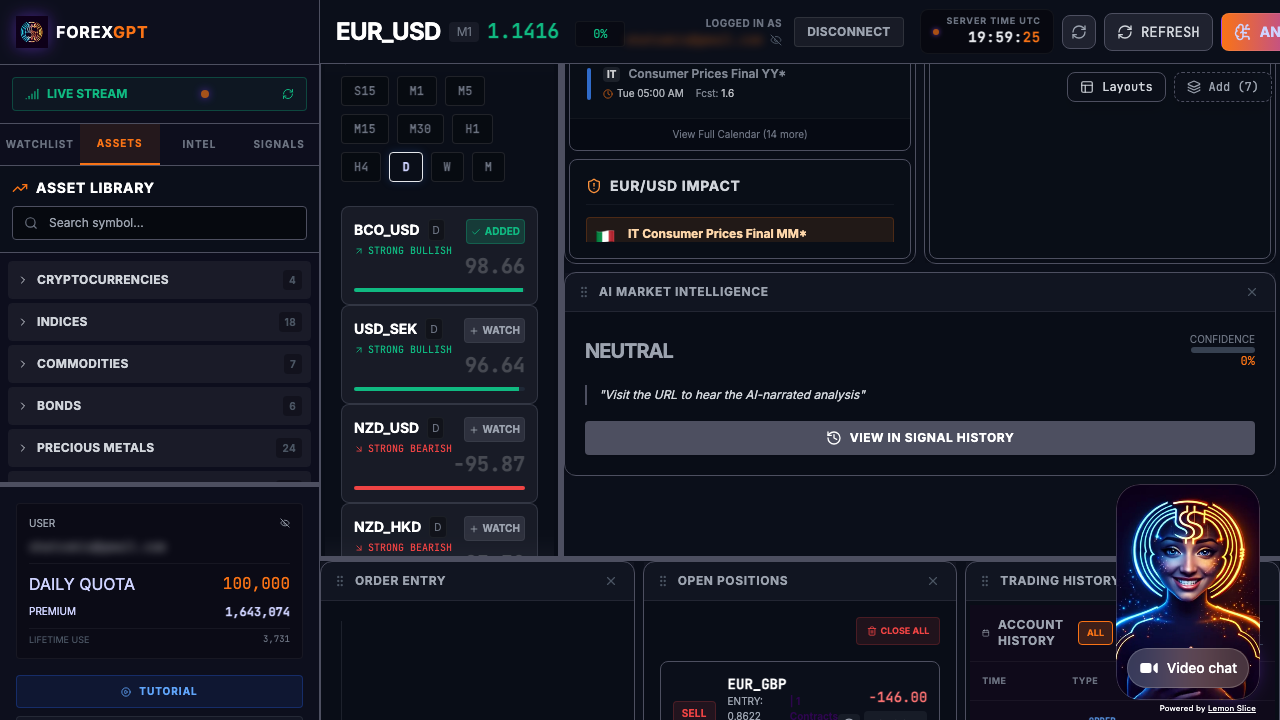
Pro Terminal (demo.forex-gpt.ai)
The full-featured terminal provides comprehensive access:
- Chat interface with widgets: Analysis displayed visually
- Interactive charts: Multiple timeframes and indicators
- Agent dashboard: Manage autonomous strategies
- 45+ MCP tools: All tools available at once
Best for: Active traders who need full functionality. Learn more about the AI trading terminal.
MCP: The Protocol Behind the Tools
ForexGPT operates as an MCP (Model Context Protocol) server, making its tools available natively inside Claude.ai and ChatGPT.com.
What is MCP?
MCP is a protocol that allows AI assistants to access external tools and data. Instead of integrating APIs into every AI app, MCP servers provide a standard interface.
Using ForexGPT via MCP
- Claude.ai: Select ForexGPT from the tool picker
- ChatGPT.com: Enable ForexGPT MCP in settings
- Native integration: Tools appear as chat commands
This means you can use ForexGPT without opening a separate application. Your analysis context stays in your AI assistant.
Security with MCP
- JWT token validation: Secure API calls
- No credentials stored: Brokerage credentials are never stored in chat
- Encrypted endpoints: All data transmitted securely
- Permission controls: You control which tools are accessible
Who ForexGPT Is For
ForexGPT is designed for active traders who want AI-assisted analysis workflows.
Ideal Users
- Active day traders: Need fast analysis across multiple assets
- Swing traders: Want sentiment and technical analysis
- Prop firm traders: Need comprehensive analysis for challenges
- Hybrid traders: Use AI for research, manual for execution
ForexGPT Is Not For
- Set-and-forget investors: ForexGPT is for active analysis
- Beginners seeking automated profits: Requires market understanding
- Traders wanting "black box" systems: We provide analysis, not magic
FAQ
What is forex analysis software?
Forex analysis software combines market data, technical indicators, and AI interpretation to help traders make informed decisions. It ranges from basic charting tools to comprehensive AI-assisted platforms.
How many tools does ForexGPT provide?
ForexGPT provides 45+ tools across the trading workflow. The free tier includes 8 essential tools; Pro provides access to all tools.
Can I trade directly with ForexGPT?
Yes. With a Pro account and OANDA connection, you can place trades directly. All trades require your explicit approval—ForexGPT is an analysis tool, not an automated bot.
Is ForexGPT available on mobile?
The chat interface is fully responsive and works on mobile devices. The Pro Terminal is web-based and accessible from any device with a modern browser.
What markets does ForexGPT cover?
ForexGPT covers 127+ instruments including forex pairs (majors, minors, exotics), crypto pairs, stock indices, and commodities like gold and oil.
Does ForexGPT provide financial advice?
No. ForexGPT is an analysis tool, not a financial advisor. All content is for informational and educational purposes only. You make all final trading decisions.
How accurate are ForexGPT's analysis tools?
Our analysis tools provide technical readings and Sentiment Scores (-100 to +100) that indicate bearish, neutral, or bullish conditions. Accuracy varies by market conditions and timeframes. We recommend using signals as one input among many in your decision-making process.
Can I save and track my favorite pairs?
Yes. Use the add_to_watchlist tool to save pairs for ongoing analysis. The Pro tier offers persistent watchlists and batch analysis.
How quickly does ForexGPT update its analysis?
Analysis updates in real-time as market data flows in. Most indicators update every 1-5 minutes depending on the timeframe and instrument.
What's the difference between free and Pro analysis?
The free tier includes basic scan_market and analyze_asset tools. Pro provides access to all 45+ tools, including agent management, advanced pattern recognition, and historical signal data.
Can I use ForexGPT alongside my existing charting platform?
Yes. Many traders use this market analysis software forex alongside their preferred charting platform for trade execution. The MCP integration also lets you use ForexGPT tools directly in Claude.ai and ChatGPT. See our AI forex trading assistant page for workflow details, or explore the AI forex signals engine.
How do I interpret conflicting signals across timeframes?
Conflicting signals often indicate market indecision or a potential reversal. Look for alignment on higher timeframes (daily, 4-hour) to determine the primary trend, and use shorter timeframes for entry timing.
About the Author
This article was written by the ForexGPT team, led by Steven Hatzakis—a financial services industry expert with over 20 years of experience in forex and fintech. For a deeper look at the platform architecture and methodology, read the ForexGPT White Paper. For his latest research on AI-driven trading systems, see Steven's paper on Protocol-Constrained Agentic Systems. Explore all guides and tools on the Learn resource hub.
This content was created with AI assistance, reviewed for accuracy by the ForexGPT team, and is updated regularly to reflect current platform capabilities.
Important Disclaimer
ForexGPT is a market analysis tool, not a financial advisor. All content on this page is for informational and educational purposes only. It does not constitute investment advice, financial advice, or trading advice.
Trading forex and other financial instruments involves substantial risk of loss and is not suitable for all investors. Past performance of any analysis tool or signal does not guarantee future results. You should carefully consider your investment objectives, level of experience, and risk appetite before trading.
ForexGPT does not guarantee the accuracy, completeness, or timeliness of any analysis or signal generated by its tools. Always conduct your own research and consult with a qualified financial advisor before making trading decisions.
Get Full Analysis Access - Try ForexGPT Free Today