AI Trading Terminal for Forex Analysis Workflows
AI Trading Terminal for Forex Analysis Workflows
An ai market terminal combines the analysis power of AI with the functionality of a professional trading platform. It integrates market data, charting tools, technical indicators, and trading execution into a unified interface—all augmented by AI assistants that help you analyze markets faster and more effectively.
Unlike traditional terminals like Bloomberg Terminal or TradingView, which require manual charting and analysis, a trading terminal ai automates much of the research workflow and provides insights through natural language interaction.
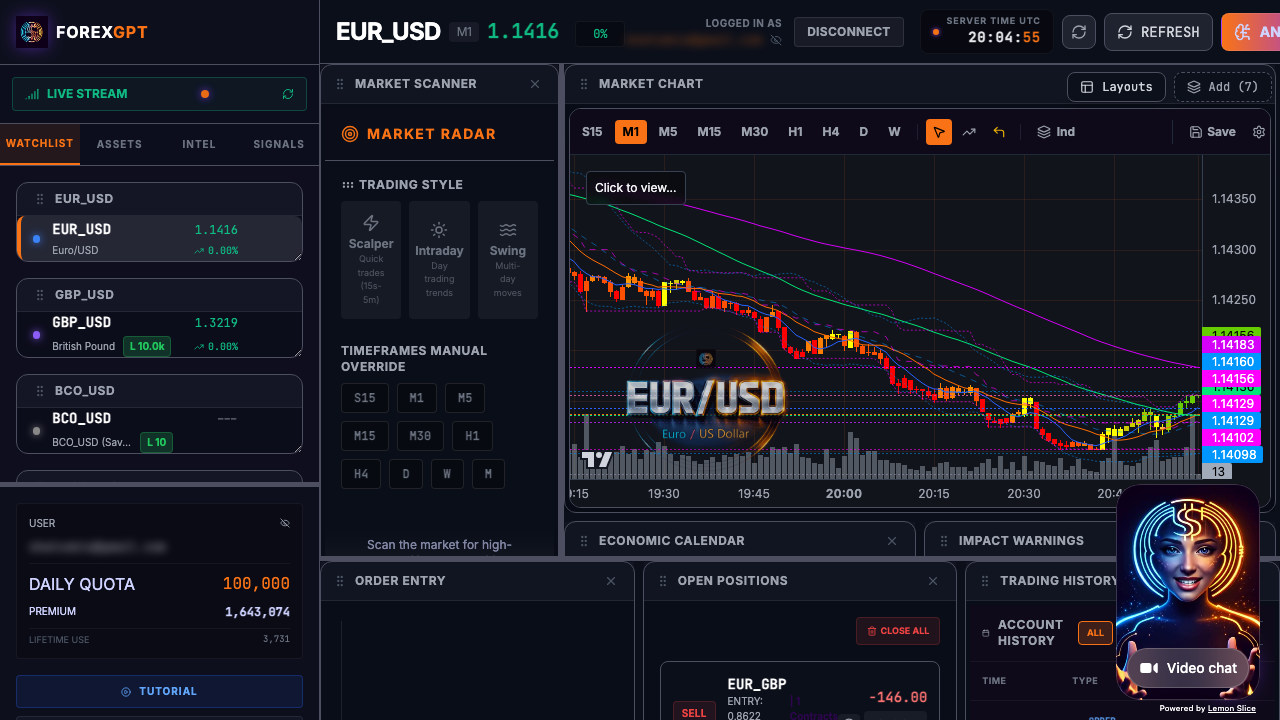
ForexGPT's Pro Terminal (demo.forex-gpt.ai) is a forex trading terminal designed specifically for forex and multi-asset traders. This ai-powered trading terminal combines 45+ MCP tools with voice control, interactive charts, and autonomous agents. Let's explore what an AI trading terminal can do and how ForexGPT delivers on this vision.
A Trader's Workflow: From Analysis to Execution
Understanding how to use an AI trading terminal effectively requires knowing the complete workflow. Here's how a typical trading session unfolds with the ForexGPT Pro Terminal:
Step 1: Market Scanning and Setup
Begin your day by scanning the market for opportunities. Say "scan the market for bullish setups" or "show me high-probability forex pairs." The AI analyzes all 127+ supported assets using your configured criteria—technical patterns, volatility levels, and economic event timing.
Step 2: Deep Asset Analysis
Once you identify promising pairs, drill down into analysis. Request "analyze EUR/USD in detail" and the system runs a comprehensive multi-dimensional analysis covering technical indicators, Sentiment Score, volatility metrics, and price structure assessment.
Step 3: Chart Review and Confirmation
The analysis automatically populates the chart panel with your selected assets. Review candlestick patterns, moving average crossovers, RSI levels, and Fibonacci retracements. Use the drawing tools to mark key support and resistance levels.
Step 4: Risk Assessment
Before executing, review the risk context. Check portfolio exposure, current drawdown, and risk-reward ratios for the proposed trade. The AI provides risk scores and suggests appropriate position sizing based on your account balance and risk tolerance.
Step 5: Trade Execution
When you're ready, execute the trade. Say "buy 0.2 lot EUR/USD at market" or "place a sell limit at 1.0850 for GBP/USD." Review the order summary, confirm your approval, and the trade is sent to your OANDA-connected account.
Step 6: Post-Trade Monitoring
After execution, use the agent dashboard or widget panel to monitor your position. Set alerts for price levels, trailing stops, or specific market conditions. Review daily performance at the end of trading hours.
This workflow demonstrates how the Pro Terminal transforms trading from a manual, time-intensive process into an efficient, AI-augmented decision-making system.
What an AI Trading Terminal Is
An AI trading terminal is a software platform that integrates:
- AI assistant: An intelligent agent that answers questions, provides analysis, and executes commands
- Market data: Real-time price feeds and historical data
- Charting tools: Interactive charts with technical indicators
- Trading execution: Order placement and position management
- Data visualization: Widgets that display analysis results
The key differentiator is the AI integration, which operates as a conversational interface to your trading tools.
How AI Trading Terminals Differ from Traditional Terminals
Traditional terminals require manual navigation through menus and charts. You must know where to find each tool and how to use it.
AI trading terminals use natural language commands and AI interpretation. You can say "scan the market for bullish setups" or "analyze EUR/USD" and the system understands your intent, runs the appropriate analysis, and presents the results.
What an AI Terminal Is Not
An AI trading terminal is not an automated trading bot. It does not execute trades without your approval. It is an analysis and workflow tool that helps you make better decisions.
The AI assistant provides analysis, identifies patterns, and helps you research—but you always make the final trading decisions.
The ForexGPT Pro Terminal
The Pro Terminal is ForexGPT's flagship interface, available at demo.forex-gpt.ai. It brings together all of ForexGPT's capabilities into a comprehensive trading environment.
Interface Overview
The Pro Terminal includes:
- Chat panel: Where you interact with the AI assistant
- Chart panel: Interactive charts with technical indicators
- Widget panel: Visual displays of analysis results
- Agent dashboard: Management of autonomous trading agents
- Tool panel: Access to all 45+ MCP tools
The interface is designed for active traders who want both analytical depth and operational efficiency.
45+ MCP Tools at Your Fingertips
The Pro Terminal provides access to all of ForexGPT's MCP tools:
- Market data tools (7): Real-time price feeds, spread analysis, economic calendar, interest rates, volatility indices, correlation matrix, and historical data queries
- Analysis tools (5): Technical analysis, sentiment analysis, pattern recognition, price projection, and volatility forecasting
- Trading tools (7): Order placement, position management, trade history, profit/loss tracking, margin calculation, risk/reward analysis, and trade journal
- Account tools (8): Portfolio overview, balance monitoring, equity tracking, margin usage, open equity, daily P&L, risk exposure, and performance analytics
- Agent tools (10): Strategy configuration, agent deployment, activity monitoring, trade proposal review, risk parameter adjustment, performance tracking, backtesting, strategy optimization, alert management, and reporting
- Prop challenge tools (5): Challenge progress tracking, daily drawdown monitoring, profit target visualization, withdrawal management, and performance statistics
- Additional tools: Watchlist management, historical pattern analysis, multi-asset comparison, reporting export, and custom dashboard widgets
Each tool is accessible through natural language commands in the chat interface, widget panel displays, or direct tool invocation.
Voice-Controlled Terminal Interface
The Pro Terminal includes a full voice trading interface for hands-free trading analysis. Say "scan the market," "analyze GBP/USD," or "show my portfolio" and the system processes your request naturally.
Voice is powered by LiveKit and xAI Grok Realtime for low-latency interaction. The voice interface is available by browser or phone dial-in.
Interactive Charting and Data Visualization
The charting tools in the Pro Terminal include:
- Multiple chart types: Candlestick, bar, line, and Heikin-Ashi for all trading styles
- 20+ technical indicators: RSI, MACD, moving averages, Bollinger Bands, Fibonacci, ATR, stochastic oscillators, Ichimoku clouds, and more
- Multi-timeframe analysis: View 5+ timeframes simultaneously on the same chart
- Drawing tools: Trendlines, support/resistance, Fibonacci retracements, Gann fans, and price channels
- Widget integration: Charts update automatically when you run analysis or adjust parameters
The chart panel is fully interactive and can be customized to your preferred layout, color scheme, and indicator configuration. Multiple chart windows can be opened and arranged according to your workflow.
Agent Dashboard for Autonomous Trading
The agent dashboard provides comprehensive management of your autonomous trading strategies:
- Start/stop agents: Activate or deactivate autonomous strategies with a single click
- Configure strategies: Set entry/exit rules, risk parameters, position sizing, and trade conditions
- Monitor activity: View real-time agent performance with live trade tracking and performance metrics
- Approve/reject proposals: Agents propose trades based on your strategy, you review and approve or reject each opportunity
- Strategy customization: Adjust strategy parameters without stopping the agent
- Performance analytics: Review agent performance with detailed statistics and equity curves
- Risk controls: Set maximum drawdown limits, position size caps, and instrument restrictions
Agents operate in supervised mode—you must approve each trade before execution. This human-in-the-loop approach provides automation benefits while maintaining complete control over your account. You can also set automatic approval rules for trades meeting specific criteria, enabling semi-autonomous operation.
Voice-Controlled Analysis
Voice control transforms how you interact with the Pro Terminal, enabling true hands-free trading workflows from any device.
Natural Language Commands
The voice interface understands context-aware commands across all trading functions:
- Market scanning: "Scan the market for bullish setups" or "find high volatility pairs"
- Asset analysis: "Analyze EUR/USD and GBP/USD" or "show me technical status of XAU/USD"
- Portfolio management: "What's in my portfolio?" or "show my current positions"
- Trade execution: "Buy 0.2 lot EUR/USD at market" or "sell limit 0.5 lot GBP/USD at 1.2750"
- Chart queries: "Show me the RSI for gold" or "display MACD on USD/JPY"
- Follow-up questions: "What about risk levels?" or "compare that with EUR/GBP"
Voice Analysis Workflow
A typical voice workflow might be:
- "Scan the market" — The AI scans all 127+ assets using your criteria
- "Analyze EUR/USD" — The AI runs detailed multi-dimensional analysis
- "Show me the chart" — The chart panel displays EUR/USD with your standard indicators
- "Place a trade" — You review the analysis and approve the trade proposal
- "Monitor this position" — The system sets up automated position tracking and alerts
Phone Dial-In with PIN Authentication
For traders on the go, voice analysis is also available by phone. Dial our dedicated access number, enter your time-limited PIN, and use voice commands to access the terminal.
Phone access is ideal for:
- Quick market checks during market hours
- Portfolio reviews after work hours
- Trade execution when away from your computer
- Emergency position management during volatile markets
The phone interface supports the same natural language commands as the browser interface, providing consistent functionality across all devices.
From Analysis to Execution
The Pro Terminal streamlines the path from market analysis to trade execution.
The Complete Workflow
- Voice or chat command to scan: "Scan for bullish setups"
- Review scan results: AI presents results in the widget panel
- Select promising assets: Choose assets to analyze further
- Run deep analysis: "Analyze XAU/USD in detail"
- Review chart and indicators: Check technical confirmation
- Review sentiment and risk context: Confirm with the Sentiment Score
- Execute trade: Approve trade execution via OANDA connection
Widget Integration
Analysis results are displayed as interactive widgets:
- Signal widgets: Show bullish/bearish readings
- Chart widgets: Display price action and indicators
- Sentiment widgets: Show market sentiment scores
- Portfolio widgets: Display account status and positions
Widgets update in real-time as market data flows in.
How to Access the Pro Terminal
The Pro Terminal is accessible through multiple paths:
- Direct access: demo.forex-gpt.ai (requires login)
- From forex-gpt.ai: Click "Open Terminal" from the main menu
- From chat interface: Switch to terminal mode within the chat interface
All access paths provide the same functionality with your account credentials. The Pro Terminal also offers a native mobile web experience, ensuring full functionality on tablets and smartphones.
Autonomous Trading Agents
The Pro Terminal includes autonomous trading agents that scan markets, analyze conditions, and propose trades based on your configured strategy.
How Agents Work
- Configure your strategy: Set parameters for entry conditions, exit rules, risk management, and position sizing
- Start the agent: Enable the agent to begin monitoring markets across all your preferred instruments
- Agent scans: The agent continuously analyzes market conditions using your preferred technical and fundamental criteria
- Propose trades: When conditions are met, the agent proposes a trade with full analysis and risk context
- You approve or reject: You receive a notification with full trade details and must approve before execution
Agents never trade without your approval. This human-in-the-loop approach provides automation benefits while maintaining complete control over your account. You can also set automatic approval thresholds for trades meeting specific criteria, enabling semi-autonomous operation for high-confidence setups.
For more on autonomous strategies, see our guide to the AI forex trading assistant and voice trading assistant. You can also explore the forex analysis software powering the terminal, the MCP trading tools protocol, the AI forex signals engine, and the market scanner.
FAQ
What is the Pro Terminal?
The Pro Terminal is ForexGPT's full-featured trading interface at demo.forex-gpt.ai. It combines 45+ MCP tools with voice control, interactive charts, widget displays, and agent management in one comprehensive workspace designed for professional trading workflows.
Can I trade directly from the Pro Terminal?
Yes. With a Pro account and OANDA connection, you can place trades directly from the terminal. All trades require your explicit approval before execution—agents and the AI assistant can only propose trades, never execute them without your confirmation.
How do I use voice control?
Say "scan the market," "analyze EUR/USD," or any natural language command. Voice is available through the browser interface or by phone dial-in with PIN authentication. The system understands context, can answer follow-up questions, and maintains conversation history throughout your session.
What tools are available in the Pro Terminal?
The Pro Terminal includes 45+ MCP tools across six categories:
| Category | Tools | Examples |
|---|---|---|
| Market Data | 7 | Real-time prices, spreads, economic calendar, volatility indices |
| Analysis | 5 | Technical analysis, sentiment, pattern recognition, price projection |
| Trading | 7 | Order placement, position management, trade history, P&L tracking |
| Account | 8 | Portfolio overview, balance, margin usage, daily P&L, risk exposure |
| Agents | 10 | Strategy configuration, deployment, monitoring, approval workflow |
| Prop Challenges | 5 | Progress tracking, drawdown monitoring, profit target visualization |
All tools are accessible through chat commands, widget displays, or direct tool invocation.
Are agents fully automated?
No. Agents operate in supervised mode—they scan markets and propose trades based on your strategy, but you must approve each trade before execution. This ensures you maintain complete control over your account. You can also set automatic approval thresholds for high-confidence setups, enabling semi-autonomous operation for proven strategies.
Is the Pro Terminal available on mobile?
The Pro Terminal is web-based and fully responsive, accessible from any device with a modern browser. For mobile trading, use the chat interface at forex-gpt.ai/chat or the voice interface by phone dial-in with PIN authentication.
How does the AI assistant differ from traditional trading bots?
Traditional trading bots execute trades automatically based on pre-set conditions. The ForexGPT AI assistant provides analysis, identifies opportunities, answers questions in natural language, and proposes trades—but you always make the final decision. The assistant learns from your trading style and preferences over time, becoming more effective at suggesting opportunities aligned with your strategy.
Can I customize the interface layout?
Yes. The Pro Terminal allows full customization of your workspace: rearrange panels, resize widgets, add/remove chart instruments, and save your preferred layout as a template for quick access on future sessions.
Is there a trial period for the Pro Terminal?
Yes. New users get full access to the Pro Terminal features for 14 days with no commitment. No credit card is required to start your trial.
How secure is my account data?
Your data is encrypted both in transit and at rest using industry-standard AES-256 encryption. We never share your personal or trading data with third parties. OANDA connections use secure OAuth authentication, and all API calls are authenticated with rotating tokens.
About the Author
This article was written by the ForexGPT team, led by Steven Hatzakis—a financial services industry expert with over 20 years of experience in forex and fintech. For a deeper look at the platform architecture and methodology, read the ForexGPT White Paper. For his latest research on AI-driven trading systems, see Steven's paper on Protocol-Constrained Agentic Systems. Explore all guides and tools on the Learn resource hub.
This content was created with AI assistance, reviewed for accuracy by the ForexGPT team, and is updated regularly to reflect current platform capabilities.
Important Disclaimer
ForexGPT is a market analysis tool, not a financial advisor. All content on this page is for informational and educational purposes only. It does not constitute investment advice, financial advice, or trading advice.
Trading forex and other financial instruments involves substantial risk of loss and is not suitable for all investors. Past performance of any analysis tool or signal does not guarantee future results. You should carefully consider your investment objectives, level of experience, and risk appetite before trading.
ForexGPT does not guarantee the accuracy, completeness, or timeliness of any analysis or signal generated by its tools. Always conduct your own research and consult with a qualified financial advisor before making trading decisions.
Ready to Transform Your Trading Workflow?
The ForexGPT Pro Terminal puts professional-grade AI trading capabilities at your fingertips—no coding, no complex setups, just powerful analysis and execution in one intuitive interface.
What You Get:
- 45+ MCP tools for comprehensive market analysis
- Voice-controlled interface for hands-free trading
- Interactive charts with 20+ technical indicators
- Supervised autonomous agents that propose trades based on your strategy
- Real-time widgets for instant insights
Start Your 14-Day Free Trial Today
Try the Pro Terminal Now — No credit card required. Cancel anytime.
Already a user? Login to your account to access your dashboard.
Related resources: Voice Trading Assistant, AI Forex Trading Assistant, Forex Analysis Software, MCP Trading Tools, AI Forex Signals, Forex Market Scanner