AI Forex Trading Assistant for Faster Market Analysis
AI Forex Trading Assistant for Faster Market Analysis
An AI forex trading assistant helps traders analyze markets, scan assets, and prepare trades faster—but it's not the same as an automated trading bot. ForexGPT provides exactly this: a comprehensive forex ai assistant with 45+ specialized tools that help you research and prepare, while you always make the final trading decisions.
Let's walk through how ForexGPT transforms your workflow—from checking market conditions at 8:30 AM to having your analysis ready before the New York session opens.
What an AI Forex Trading Assistant Actually Does
An AI forex trading assistant is a software tool that uses artificial intelligence to help traders with their market analysis workflows. It scans multiple assets, interprets technical indicators, gauges market sentiment, and presents findings in an organized way.
Crucially, an assistant differs from a trading bot in one key way: it does not execute trades automatically. A trading bot places orders on your behalf based on programmed rules. An AI assistant provides analysis, identifies potential setups, and helps you make better decisions—but the final trade execution remains in your hands.
ForexGPT operates as an AI analysis assistant, not an automated trading system. The platform provides tools for:
- Scanning 127+ forex, crypto, indices, and commodities assets
- Generating AI-powered sentiment scores
- Analyzing technical indicators across multiple timeframes
- Visualizing market data through interactive heatmaps
- Voice-controlled interaction for hands-free analysis
As an ai assistant for forex traders, ForexGPT reduces the time spent on manual research while keeping you in control of your trading decisions.
How ForexGPT Works as Your Analysis Workflow
Here's a real-world example of how you'd use ForexGPT in your daily routine:
8:30 AM - Morning Market Review
You open the chat interface and say: "Scan the market for bullish setups with a minimum sentiment score of 30." The system runs scan_market with your criteria and returns the top-ranked assets by sentiment strength.
8:45 AM - Deep Analysis
You select EUR/USD and ask: "Analyze EUR/USD in detail with 4H, 1H, and 15M timeframes." This ai-powered forex analysis calls analyze_timeframes for EUR/USD, returning daily, 4-hour, 1-hour, and 15-minute readings side by side, each with its own signal direction and Sentiment Score.
9:00 AM - Chart Verification
You ask: "Show me the EUR/USD chart with RSI, MACD, and Bollinger Bands." The system calls get_chart_data and displays an interactive chart with all indicators. You notice the 4H chart shows a bullish divergence in RSI while sentiment is bearish—a potential reversal signal.
9:15 AM - Sentiment Check
You want to understand the market mood: "What's the sentiment for EUR/USD and how does it compare to GBP/USD?" This forex trading ai tool calls get_live_heatmap and the sentiment analysis tools, showing EUR/USD at -42 sentiment (moderately bearish) while GBP/USD is at -78 (strongly bearish).
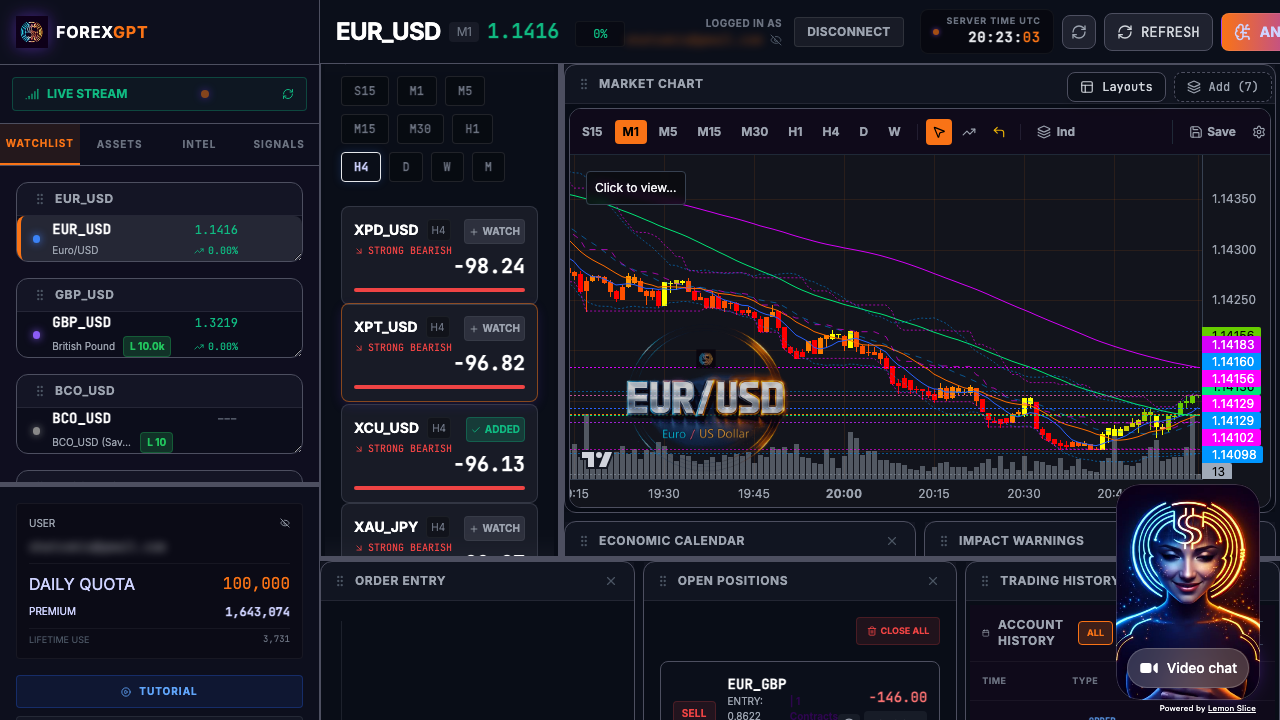
9:30 AM - Decision
Based on the analysis, you decide to watch the 1.0850 support level in EUR/USD. When the price approaches that level during the session, you'll re-run analyze_asset to confirm your entry. This ai market analysis assistant workflow takes under 15 minutes and covers ground that would take hours manually.
The Tool Chain in Action
Notice how each step used specific tools:
scan_market— Initial filtering across 127+ assetsanalyze_timeframes— Multi-timeframe analysis with signal alignmentget_chart_data— Chart display with technical indicatorsget_live_heatmap— Market-wide sentiment and strengthanalyze_asset— Detailed analysis when ready to trade
Each tool is accessible through natural language commands in the chat, voice interface, or Pro Terminal.
Key Capabilities
ForexGPT's capabilities are organized across four categories: market data, analysis, trading, and portfolio management.
Market Scanning Across 127+ Assets with Custom Filters
The scan_market tool is the foundation of ForexGPT's analysis system. It scans 127+ instruments including major and minor forex pairs, exotic pairs, crypto pairs, stock indices, and commodities like gold and oil.
What makes ForexGPT's market scanner different is how it ranks assets by Sentiment Score. You can specify:
- Timeframes to scan (e.g., 4H, Daily, Weekly)
- Minimum sentiment score threshold (e.g., min_score of 50 for strong bullish setups)
- Result limit (how many top results to return)
Workflow example: "Scan for the top bullish setups on the 4H timeframe with sentiment above 50." The scanner ranks all assets by sentiment strength and returns the top matches, each with their Sentiment Score and signal direction.
This tool is one of the 8 free-tier tools, available with a daily 57,000 free token allowance.
AI Sentiment Scoring from Technical Context
Market sentiment measures whether an asset is technically bullish (positive momentum) or bearish (negative momentum). ForexGPT's AI sentiment scoring is derived from technical context—trend, momentum, and range behavior across core indicators.
The Sentiment Score ranges from -100 (extremely bearish) to +100 (extremely bullish), with 0 representing neutral sentiment. It is calculated from the OHLC of the last candle combined with SMAs (7, 14, 50, 100), Bollinger Bands, and Donchian Channels—then normalized into a single score.
Important: The Sentiment Score itself is the measure of signal strength. Scores near 0 indicate neutral conditions, while scores near the extremes (-100 or +100) indicate strong bearish or bullish technical readings.
Live Heatmap Visualization for Market Overview
The live heatmap provides a visual overview of Sentiment Scores across assets. Assets are color-coded: green for bullish sentiment, red for bearish sentiment, and yellow for neutral. It operates in two modes: Assets mode (up to 15 assets per timeframe) or Timeframes mode (up to 15 timeframes per asset).
The heatmap is free to use and does not consume tokens. It covers multiple asset classes. You can filter by asset type to focus on forex pairs, crypto, indices, or commodities. This is an excellent tool for identifying which markets are currently showing the strongest technical signals.
Pro tip: Use the heatmap at the start of your session to identify the top 5 strongest and top 5 weakest assets, then run scan_market with filters for those specific pairs.
Chart Analysis with Technical Indicators
The chart analysis tools display interactive charts with 20+ technical indicators available. You can switch between timeframes from 1-minute to monthly, add custom indicator configurations, and save chart presets for recurring analysis patterns.
Key indicators available include:
- Moving averages (SMAs 7, 14, 50, 100)
- Momentum oscillators (RSI, Stochastic, MACD, CCI, Momentum, Williams %R, Awesome Oscillator)
- Volatility bands (Bollinger Bands, Keltner Channels, ATR, Donchian Channels)
- Trend indicators (ADX, Parabolic SAR, Ichimoku)
- Fibonacci retracement and extension levels
Workflow example: "Plot USD/JPY with 50-period and 200-period SMAs, plus RSI with overbought/oversold lines." The system calls get_chart_data with those specific parameters and renders the chart with your preferred configuration.
Voice-Controlled Terminal for Hands-Free Analysis
The voice feature lets you control ForexGPT using natural language commands. Say "scan the market," "analyze EUR/USD," "show my portfolio," or "place a trade"—and the assistant processes your request.
Voice is powered by LiveKit and xAI Grok Realtime, enabling low-latency interaction. You can access it via the Pro Terminal at demo.forex-gpt.ai or by calling a dedicated phone number with a time-limited PIN.
Multi-Platform Access and MCP Integration
ForexGPT is available across three interfaces:
- AI Chat at forex-gpt.ai/chat—text and voice chat with interactive widgets, rendered charts, and data tables
- Voice at forex-gpt.ai/voice—audio-only interface for hands-free analysis
- Pro Terminal at demo.forex-gpt.ai—full trading platform with dedicated panels and agent dashboards
The platform also operates as an MCP server, making its tools available natively inside Claude.ai and ChatGPT.com. Traders can use ForexGPT's tools directly within their preferred AI assistant.
MCP integration example: In Claude.ai, type / and select scan_market. Specify your criteria ("bullish setups with sentiment above -30"), and Claude calls the ForexGPT tool directly. Results appear in your chat history as interactive widgets—no browser tab switching required.
Available on Claude.ai, ChatGPT, and Pro Terminal
As an MCP (Model Context Protocol) server, ForexGPT integrates directly into AI assistants:
- In Claude.ai, type
/and select ForexGPT tools from the tool picker - In ChatGPT.com, enable the ForexGPT MCP server in your settings
- In the Pro Terminal, access all tools through the chat interface
This integration means you can use ForexGPT's analysis without switching between applications. Your analysis context remains in your AI assistant, and you can request new scans or analyses using natural language.
Free vs Pro: What You Get
ForexGPT offers a transparent tier structure with clear distinctions between free and paid features.
Free Tier: 8 Essential Tools
The free tier requires no login and provides access to these 8 tools:
- scan_market—Scans 127+ assets for trading setups
- get_chart_data—Retrieves candlestick data and technical indicators
- get_live_spreads—Shows current spreads across major pairs
- get_economic_calendar—Displays upcoming economic events
- get_blog_articles—Accesses ForexGPT's analysis blog
- search—Searches across market data and articles
- get_live_heatmap—Shows real-time asset performance
- get_platform_health—Monitors system status and availability
Pro Tier: 45+ Tools for Full Trading Workflows
The Pro tier includes everything in the free tier plus:
- Live trading—Place market, limit, and stop orders via OANDA connection
- Portfolio and account management—Track positions, margin, and equity
- AI-powered asset analysis—Deep analysis with sentiment and technicals
- Multi-timeframe analysis—Analyze across 5+ timeframes simultaneously
- Watchlist management—Build and track custom asset lists
- Sentiment scoring—Detailed sentiment analysis for each asset
- Autonomous agents—AI agents that propose trades based on your strategy
- Trade history and analytics—Review past trades and performance metrics
- Voice overlay in chat—Natural language voice commands within the chat interface
The Pro tier requires authentication with Auth0 OAuth 2.0 for secure access to brokerage connections and personal data.
What to Look for in an AI Forex Trading Assistant
When evaluating AI trading assistants, consider these key factors:
Real Tool Names and Workflow Transparency
Many tools claim to "analyze markets" but don't specify how. ForexGPT exposes its actual tool chain—scan_market, analyze_asset, analyze_timeframes, get_live_spreads—so you understand exactly what happens when you ask for analysis. You can also explore forex trading signals software built on the same transparent methodology. This transparency helps you reproduce successful workflows and troubleshoot when results differ from expectations.
Free Tier Depth Without Paywall Lock Some platforms give you a glimpse of features but hide the meat behind the paywall. ForexGPT's free tier includes 8 tools and a daily 57,000 free token allowance, plus free heatmap scanning. You can run market scans, view charts, and check the economic calendar before upgrading to Pro for execution features.
No Guaranteed-Profit Claims The CFTC has cracked down on AI trading tools that promise "guaranteed profits" or "90% win rates." ForexGPT doesn't make these claims—our tools provide analysis and insights, but you always make the final trading decision. This honesty reflects our focus on education and analysis rather than misleading performance claims.
MCP Integration for Seamless Workflow
The ability to access ForexGPT's tools directly within Claude.ai and ChatGPT.com eliminates context switching. When you're analyzing market conditions in your AI assistant, you can run get_chart_data or analyze_timeframes without leaving your workflow. This integration is especially valuable for traders who already use AI assistants for research and planning.
How AI Improves Analysis Speed (Without Replacing Judgment)
AI excels at processing large volumes of data quickly and identifying patterns that might be missed in manual analysis. ForexGPT's AI tools can scan 127+ assets, calculate dozens of technical indicators for each, and generate sentiment scores—all in seconds.
This speed improvement allows you to:
- Cover more market ground during your daily review
- React faster to emerging opportunities
- Test multiple analysis scenarios quickly
- Focus your human judgment on interpretation and execution
However, there are important limitations to understand. AI analysis tools cannot predict future market movements with certainty. They identify patterns in historical data, but markets are influenced by countless unpredictable factors—including geopolitical events, central bank decisions, and unexpected economic data.
The CFTC (Commodity Futures Trading Commission) has issued warnings about AI trading scams that promise guaranteed profits or high win rates. ForexGPT does not make these claims. Our tools provide analysis and insights, but they do not guarantee profitable trades.
Every market analysis has uncertainty. AI reduces the time spent on research but does not eliminate the need for sound risk management, experience, and independent judgment.
FAQ
Is ForexGPT a trading bot?
No, ForexGPT is not a trading bot. It is an analysis assistant that helps you research markets and prepare trades. The platform does not execute trades automatically—you make all final trading decisions. If you connect your OANDA account, you can place trades directly from the interface, but each trade requires your explicit approval. The autonomous agents in the Pro tier also operate in supervised mode—you must approve each trade before execution.
Can I trade directly from ForexGPT?
Yes, with a Pro account and an OANDA brokerage connection, you can place trades directly from the Pro Terminal. The platform supports market orders, limit orders, and stop-loss orders. All trades go through your OANDA account using encrypted API calls, and ForexGPT never holds your funds. The get_live_spreads tool shows current OANDA spreads before you place your order, helping you evaluate execution costs.
What markets does ForexGPT cover?
ForexGPT covers 127+ instruments including major and minor forex pairs (EUR/USD, GBP/USD, USD/JPY, etc.), exotic pairs (USD/MXN, EUR/SEK, etc.), 4 crypto assets (including BTC/USD), stock indices (S&P 500, NASDAQ, DAX, etc.), and commodities (Gold, Silver, Oil, etc.). The scan_market tool works across all these asset classes, applying asset-specific analysis parameters automatically.
Is my brokerage account secure?
Yes. ForexGPT uses Auth0 with industry-standard OAuth 2.0 for authentication. Your OANDA credentials are never stored in the chat interface—only OAuth tokens are cached. All API calls to OANDA go through encrypted endpoints with JWT token validation. For phone access, voice PINs are single-use and time-limited (30 minutes), and the voice system uses end-to-end encryption.
Is ForexGPT free?
ForexGPT offers a free tier with 8 essential tools, including market scanning (scan_market), chart data retrieval (get_chart_data), live spreads (get_live_spreads), economic calendar (get_economic_calendar), blog access, search, heatmap visualization (get_live_heatmap), and platform health monitoring. The Pro tier unlocks 45+ additional tools for live trading, portfolio management, and advanced analysis.
What's the difference between the Pro Terminal and the AI Chat?
The Pro Terminal (demo.forex-gpt.ai) is a full-featured trading platform with dedicated panels for charts, widgets, and agent dashboards. It's optimized for active traders who want comprehensive market visibility. The AI Chat (forex-gpt.ai/chat) is a web-based interface with interactive widgets and voice control—ideal for quick analysis and decision-making. Both provide access to the same 45+ MCP tools, but the Pro Terminal offers multi-panel layouts and agent management that the chat interface doesn't support.
How does multi-timeframe analysis work in ForexGPT?
When you run analyze_timeframes on an asset, the system generates signals across 5+ timeframes: daily, 4-hour, 1-hour, 30-minute, and 15-minute. Each timeframe provides its own signal direction (bullish/bearish/neutral) and Sentiment Score. The analysis also highlights alignment—whether signals agree across timeframes (stronger signal) or conflict (potential caution). For example, a daily bullish signal with 4-hour and 1-hour bearish signals suggests you should wait for shorter-term bears to exhaust before entering long positions.
Can I use ForexGPT tools in Claude or ChatGPT?
Yes. As an MCP server, ForexGPT integrates natively into Claude.ai and ChatGPT.com. In Claude, type / and select ForexGPT tools like scan_market or get_chart_data. In ChatGPT, enable the ForexGPT MCP server in your settings. This lets you run market scans, pull charts, and check sentiment without leaving your AI assistant—seamlessly integrating analysis into your existing workflow.
About the Author
This article was written by the ForexGPT team, led by Steven Hatzakis—a financial services industry expert with over 20 years of experience in forex and fintech. For a deeper look at the platform architecture and methodology, read the ForexGPT White Paper. For his latest research on AI-driven trading systems, see Steven's paper on Protocol-Constrained Agentic Systems. Explore all guides and tools on the Learn resource hub.
This content was created with AI assistance, reviewed for accuracy by the ForexGPT team, and is updated regularly to reflect current platform capabilities.
Important Disclaimer
ForexGPT is a market analysis tool, not a financial advisor. All content on this page is for informational and educational purposes only. It does not constitute investment advice, financial advice, or trading advice.
Trading forex and other financial instruments involves substantial risk of loss and is not suitable for all investors. Past performance of any analysis tool or signal does not guarantee future results. You should carefully consider your investment objectives, level of experience, and risk appetite before trading.
ForexGPT does not guarantee the accuracy, completeness, or timeliness of any analysis or signal generated by its tools. Always conduct your own research and consult with a qualified financial advisor before making trading decisions.
Start Analyzing Markets - Try ForexGPT Free Today